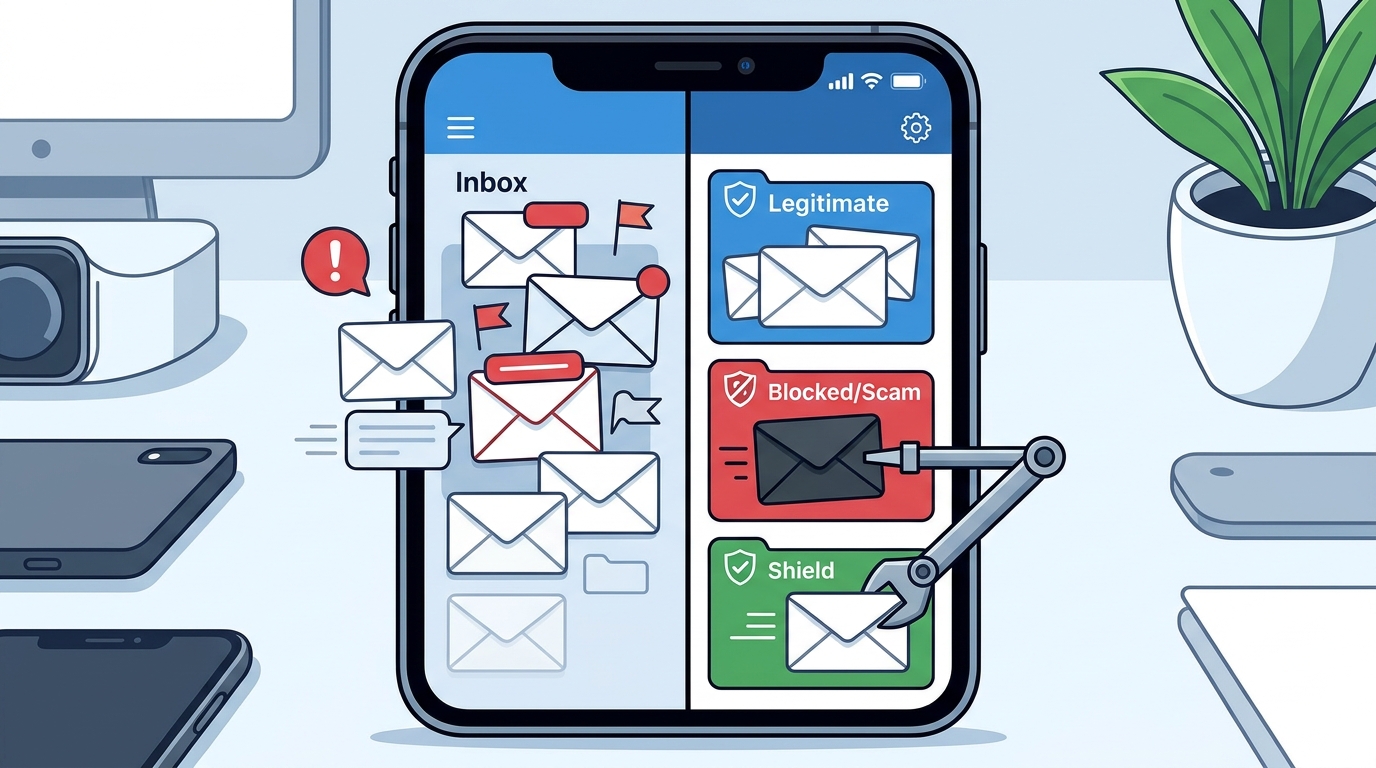
Apple's built-in spam filter is a passive labeler that flags known bad numbers but does not stop them. Dedicated text protection services like PhoneShield.ai actively sort incoming messages into folders, blocking scams before they clutter your inbox. For users who want zero manual effort and automated sorting, dedicated services are the superior choice. For those who only need a visual warning, the built-in tool is sufficient.
Apple's Built-in Spam Filter
Apple's native spam protection is a passive labeling system that identifies known spam numbers based on carrier data and user reports. It is a visual warning tool that marks messages as "Potential Spam" in the notification center and the Messages app. This feature is free and requires no setup, making it the default baseline for all iPhone users. However, it does not move messages to a separate folder or block them from arriving on your device. The primary limitation is that it relies on a number being already reported as spam. If a scammer uses a new, clean number, the built-in filter will not flag it. It is best suited for users who are comfortable manually reviewing their inbox and do not mind seeing spam notifications, provided they can distinguish between a legitimate text and a scam.
PhoneShield.ai Dedicated Text Protection
PhoneShield.ai is an active text filtering service that uses AI to read and categorize every incoming message from unknown numbers. It is a proactive defense mechanism that sorts texts into specific folders such as Spam, Transactions, and Promotions. Unlike the built-in filter, PhoneShield does not just label a message; it physically moves it out of your main inbox. This service is particularly effective for families protecting older parents, as it prevents the "wrong number" and romance scams that often start with a friendly, harmless-looking text. The system uses a shared scam list and AI analysis to determine intent, ensuring that one-time codes and bank alerts are never filtered into spam. It is ideal for users who want a clean inbox and do not want to manually sort through hundreds of unwanted messages.
Comparison Table
| Criteria | Apple Built-in Filter | PhoneShield.ai |
|---|---|---|
| Filtering Method | Passive labeling | Active AI sorting |
| Inbox Clutter | Spam remains in inbox | Spam moved to separate folder |
| New Number Detection | Low (requires prior reports) | High (AI content analysis) |
| Cost | Free | Part of subscription |
| Setup Effort | None | One-time configuration |
Choose Apple's Filter If
Choose Apple's built-in filter if you are a tech-savvy user who is comfortable manually reviewing your messages. It is the right choice if you receive a low volume of spam and do not mind seeing a "Potential Spam" label next to a notification. This option is best for users who want to avoid any third-party data processing and prefer to keep all their data within the Apple ecosystem. It is also suitable for users who are not concerned about the specific content of the text, only the sender's identity.
Choose PhoneShield.ai If
Choose PhoneShield.ai if you want a completely clean inbox with zero manual effort. It is the ideal solution for protecting elderly parents who are vulnerable to sophisticated text-based scams. This service is best for users who receive a high volume of marketing texts, one-time codes, and scam attempts. If you want the system to decide what is important and what is noise, PhoneShield provides that automation. It is the clear winner for anyone who values their time and wants to stop the noise before it reaches their attention.
Frequently Asked Questions
Does PhoneShield replace the built-in Apple filter?
Yes, when you set PhoneShield as your text filter in iOS settings, it takes over the filtering process. The built-in Apple filter is effectively bypassed for unknown numbers, as PhoneShield handles the sorting and categorization directly.
Can I switch back to the built-in filter later?
Yes, you can switch back at any time by going to Settings, then Messages, and changing the Text Message Filter back to Apple. Your PhoneShield subscription will continue, but the text filtering feature will no longer be active on that device.
Does PhoneShield filter texts from my contacts?
No, PhoneShield only filters texts from unknown numbers. Any text from a number saved in your contacts is always delivered directly to your main inbox, regardless of its content.
Is there a cost for the text filtering feature?
The text filtering feature is included in the PhoneShield subscription. There is no additional charge for using the text filter, and it works in conjunction with the call screening features of the service.
How does PhoneShield handle one-time codes?
PhoneShield has a specific rule that ensures one-time codes, such as those from banks or email providers, are never moved to the Spam folder. They are always delivered to the Transactions folder or your main inbox to ensure you never get locked out of your accounts.