

Caller ID verification is a technical protocol that validates the origin of a phone call to detect spoofing. It works by checking digital signatures attached to call data, but it cannot verify the identity of the person speaking. For families, this means standard verification alone is insufficient to stop sophisticated scams, requiring active screening tools like PhoneShield to intercept fraudulent calls before they ring.
The Mechanics of STIR/SHAKEN
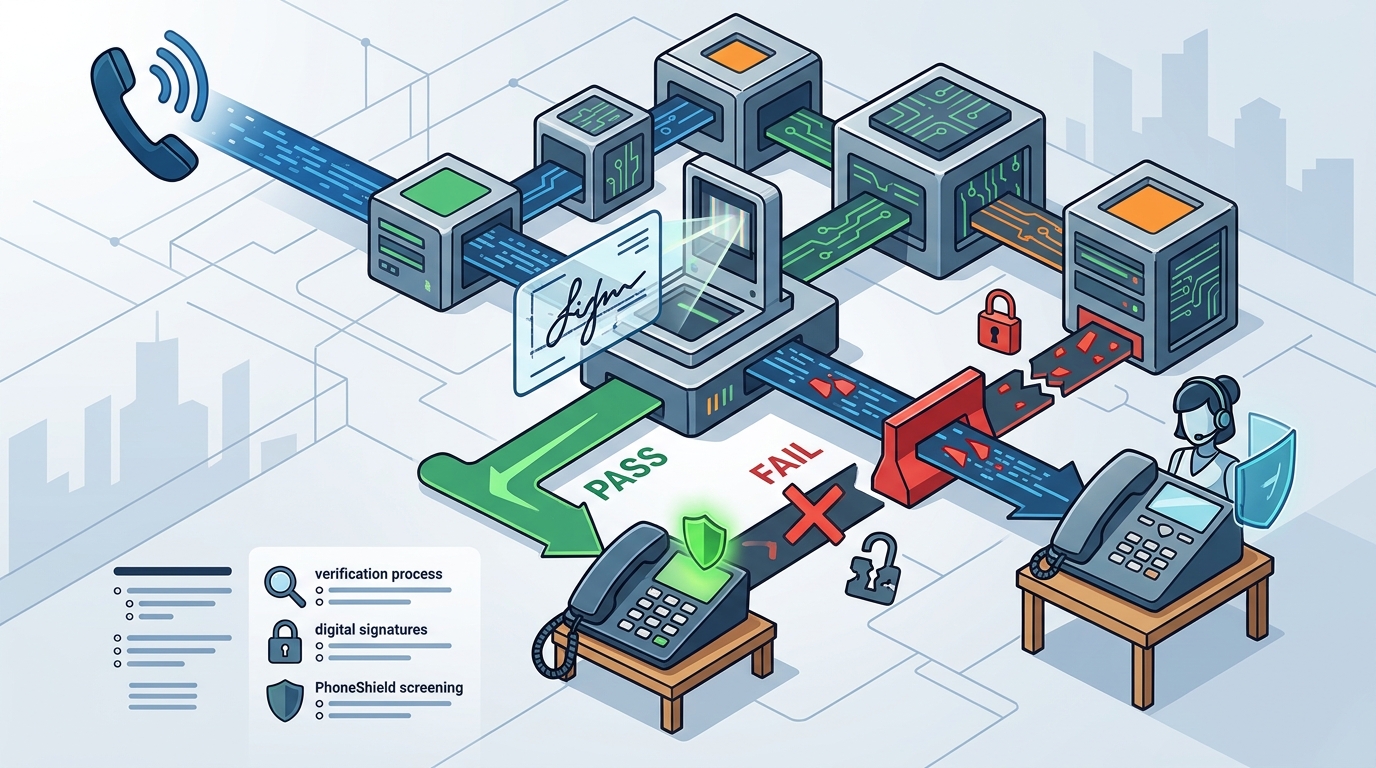
Modern caller ID verification relies on a framework known as STIR/SHAKEN. This system uses digital signatures to prove that a call originated from a specific carrier. When a call is placed, the originating carrier signs the call data with a private key. The receiving carrier then verifies this signature using a public key. If the signature is valid, the call is marked with a high level of trust.
However, this process only confirms the carrier, not the caller. A scammer can use an internet phone account to generate a valid signature from a legitimate carrier. This allows them to display a fake local number with a high trust rating. The system is designed to stop obvious spoofing, but it fails against actors who have access to legitimate carrier infrastructure.
Why Verification Fails Against Scammers
Scammers exploit the gap between carrier verification and identity verification. They use Voice over Internet Protocol (VoIP) services that do not require identity checks. These services allow them to display any number they choose. The call enters the U.S. network with a carrier's stamp of approval, bypassing basic verification checks. This is why a number can appear as 'verified' while still being used for fraud.
The Federal Communications Commission (FCC) has noted that some phone companies have become complicit in illegal robocalling by failing to check who their callers are. In April 2026, the FCC proposed stricter identity rules to address this. Until these rules are fully enforced, verification remains a weak defense. Families must rely on tools that look beyond the digital signature to the content of the call itself.
Active Screening vs. Passive Verification
Passive verification simply labels calls. Active screening answers them. PhoneShield uses a different approach by forwarding calls to a secure endpoint. This endpoint refuses known scam numbers before the phone rings. It also screens unknown callers by asking them to identify themselves. This active process catches scammers who bypass STIR/SHAKEN. It ensures that only legitimate callers reach the family member's device.
The distinction is critical for protecting older adults. A passive filter might let a scam call through because the signature is valid. An active shield like PhoneShield intercepts the call and analyzes the conversation. It turns away sales pitches and scam scripts. This proactive defense is necessary because the volume of robocalls continues to rise, with over 52.5 billion placed in 2025.
Protecting Your Family's Phone
Implementing caller ID verification is not enough to stop all scam calls. You need a solution that combines verification with active screening. PhoneShield offers a flat monthly price that includes unlimited scam refusals and front-desk screening. It also includes an AI assistant named Nora for handling complex queries. This setup ensures that your parent's phone remains a tool for connection, not a target for fraud.
Setting up this protection is straightforward. You forward your parent's existing number to PhoneShield. They keep their number, their phone, and their routine. Known scammers are refused before the phone rings. Family and favorites ring straight through. Everyone else must explain who they are and why they are calling. This simple change provides a robust layer of security that standard carrier verification cannot offer.
Key Takeaways
- STIR/SHAKEN verifies the carrier, not the caller, leaving a gap for sophisticated scammers.
- Valid digital signatures do not guarantee a call is legitimate, as scammers can use legitimate carrier infrastructure.
- Passive verification labels calls but does not stop them from ringing.
- Active screening, like PhoneShield's front desk, answers calls and screens callers before they reach the user.
- PhoneShield refuses known scam numbers before the phone rings, providing a proactive defense.
- Setting up PhoneShield is simple and allows parents to keep their existing number and routine.
- The FCC is working on stricter identity rules, but active screening is currently the most effective defense.
Frequently Asked Questions
Does caller ID verification stop all scam calls?
No, caller ID verification only validates the carrier's signature. It does not verify the identity of the person calling. Scammers can use legitimate carrier infrastructure to bypass verification, so active screening is required to stop all scam calls.
What is STIR/SHAKEN?
STIR/SHAKEN is a framework for caller ID authentication. It uses digital signatures to verify that a call originated from a specific carrier. It helps detect spoofing but does not prevent all fraud.
How does PhoneShield differ from standard verification?
PhoneShield uses active screening to answer calls and screen callers. It refuses known scam numbers before the phone rings and asks unknown callers to identify themselves. Standard verification only labels calls without stopping them.
Can I keep my parent's existing phone number with PhoneShield?
Yes, PhoneShield allows you to forward your parent's existing number to the service. They keep their number, their phone, and their routine. Nobody they know has to learn anything new.
Is PhoneShield expensive?
PhoneShield offers a flat monthly price that includes unlimited scam refusals and front-desk screening. It also includes an AI assistant for handling complex queries. This provides a cost-effective solution for protecting your family.
How long does it take to set up PhoneShield?
Setting up PhoneShield takes about ten minutes. You forward your parent's number to PhoneShield, and the service starts handling calls immediately. The setup is simple and does not require a new phone or routine.