%22%3E%3C%2Fpath%3E%3C%2Fsvg%3E)

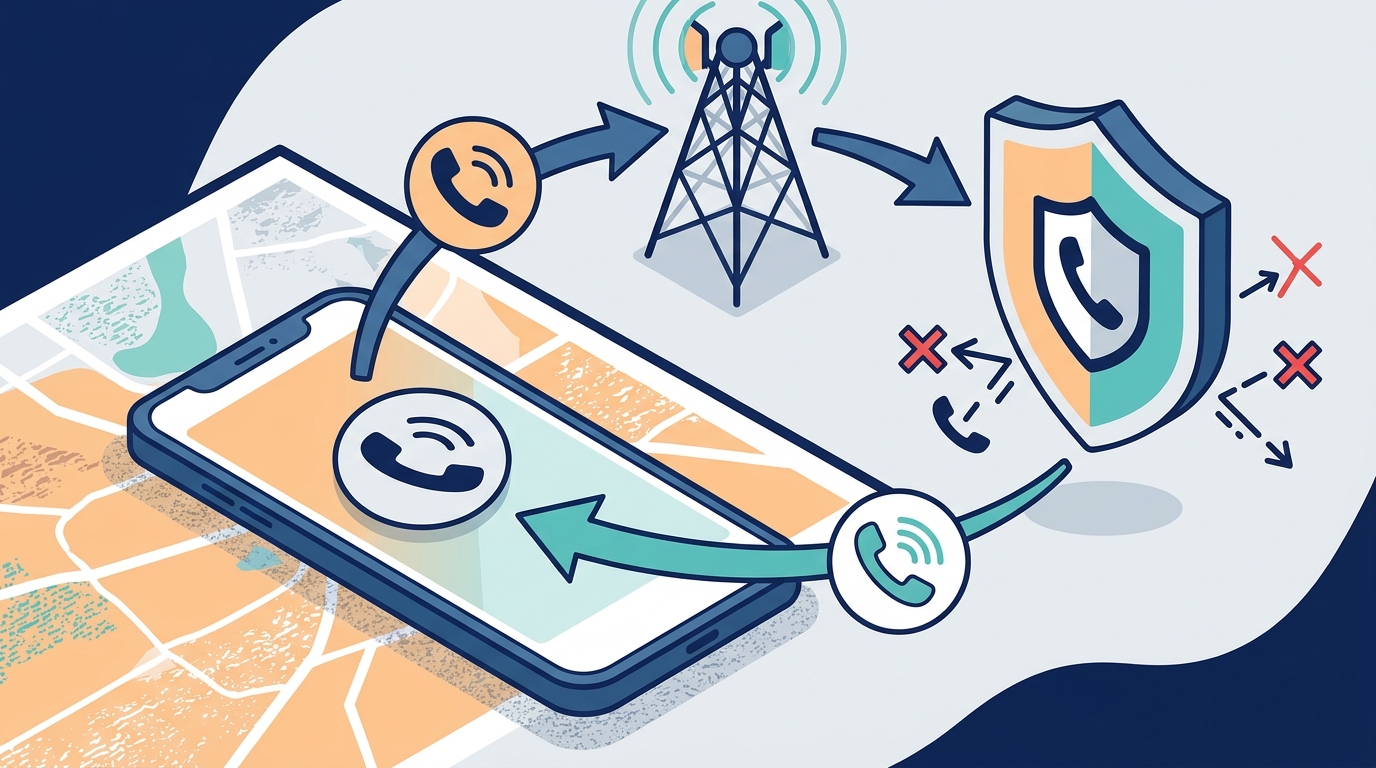
PhoneShield.ai stops robocalls without installing an app on your device. It uses call forwarding to intercept and screen calls before they ring. This guide covers how to choose, verify, and implement app-free protection in Houston.
How to Choose: What Separates a Good Option from a Bad One
Choosing a robocall blocker without an app requires focusing on the mechanism of interception. A call forwarding service is a platform that redirects incoming calls to a third-party number for screening before routing them back. This is the only reliable method that works without installing software on the target device. Apps that rely on local databases or device-level permissions often fail on older phones or landlines. When evaluating providers, look for those that use carrier-level forwarding rather than device-level blocking. The provider must be able to answer the call, identify the caller, and decide whether to connect it. This active screening is superior to passive number blocking, which only works if the number is already known to be bad.
Active Screening vs. Passive Blocking
Passive blocking relies on a list of known bad numbers. Active screening answers the call and asks the caller to identify themselves. PhoneShield.ai uses active screening with an AI front desk. This ensures that even new, unlisted scam numbers are caught. The distinction is critical for Houston residents who receive high volumes of unknown calls. A good provider will clearly state that they answer the call. A bad provider will only promise to block numbers from a static list.
What to Ask: The Specific Questions to Ask Before Committing
Before subscribing to any service, you must ask specific questions to ensure it fits your needs. First, ask if the service requires an app on the protected phone. If the answer is yes, it is not an app-free solution. Second, ask how the service handles landlines. Many app-based blockers do not work on landlines. Third, ask about the setup process. Does it require changing your phone number? PhoneShield.ai keeps your existing number, which is crucial for maintaining contact with family and local Houston businesses. Finally, ask about the transparency of the screening process. You should be able to see why a call was blocked or allowed.
Key Questions for Providers
- Does the service require an app on the protected device?
- Does it support landlines and flip phones?
- Can I keep my existing phone number?
- How do I review blocked calls?
- Is there a free trial or money-back guarantee?
How to Verify: How to Check That a Claim or Credential is Real
Verifying a provider's claims is essential to avoid scams that mimic legitimate services. Check the provider's legal entity and location. PhoneShield.ai is operated by Who Can It Be, LLC, a Florida company. You can verify this through state business registries. Look for a clear privacy policy that explains how call data is handled. A legitimate provider will not sell your call data. They should also provide a way to test the service. PhoneShield.ai offers a test call feature where you can call your own number to see how the front desk responds. This practical verification is more valuable than marketing claims. Avoid providers that do not have a physical address or clear legal terms. according to New Study Finds
How It Works: What Happens, in What Order, and How Long It Takes
Setting up app-free robocall protection is a straightforward process that takes about ten minutes. The first step is to subscribe to the service and receive a dedicated forwarding number. The second step is to enable call forwarding on your phone using a simple carrier code. The third step is to verify the setup by making a test call. Once active, every incoming call is forwarded to the provider's system. The system checks the number against a shared scam list. If it is a known scam, it is refused before your phone rings. If it is a family member or favorite, it rings through immediately. If it is an unknown number, an AI assistant answers and asks who is calling. This process happens in seconds, and you receive a notification with the outcome.
The Three-Step Setup
- Subscribe and receive your forwarding number.
- Enable call forwarding on your device using carrier codes.
- Verify with a test call and configure your favorites.
What It Costs: What Drives the Price Up or Down
The cost of app-free robocall protection varies based on the features included. PhoneShield.ai offers a flat monthly rate that includes unlimited scam refusals and front-desk screening. The price is driven down by the efficiency of the AI screening system, which handles the majority of calls without human intervention. Additional costs may arise if you use the AI assistant for extended conversations, which are metered per minute. This model is more predictable than pay-per-block models, which can become expensive if you receive many calls. When comparing costs, consider the total value of the protection, not just the monthly fee. A slightly higher price that includes active screening is often better than a cheaper service that only blocks known numbers. according to Combating Robocalls and
What Goes Wrong: The Common Mistakes and How to Avoid Them
The most common mistake is not configuring your favorites list. If you do not add family members and essential contacts to your favorites, they may be screened by the AI assistant, which can be inconvenient. Another mistake is not testing the setup. Always make a test call to ensure that forwarding is working correctly. A third mistake is assuming that the service will block all calls. No service can guarantee 100% blocking, but active screening significantly reduces the volume of unwanted calls. Finally, do not forget to update your forwarding settings if you change carriers. The forwarding code may need to be re-entered. These simple steps ensure that the protection works as intended.
Versus Alternatives: How This Compares to the Alternatives
| Feature | App-Based Blocker | Carrier Service | PhoneShield.ai |
|---|---|---|---|
| App on Protected Phone | Required | Not Required | Not Required |
| Landline Support | No | Limited | Yes |
| Active Screening | No | No | Yes |
| AI Assistant | No | No | Yes |
| Cost | Low to Medium | Free to Low | Medium |
For a Specific Situation: How the Answer Changes for a Particular Case
The best solution depends on your specific situation. If you are protecting an elderly parent who uses a flip phone, an app-free solution is the only option. Flip phones cannot run modern apps, so app-based blockers are useless. If you are a small business owner in Houston, you need a solution that can handle customer calls while blocking sales pitches. PhoneShield.ai's front desk can take messages from real customers and block unwanted calls. If you are a frequent traveler, you need a solution that works across carriers. Call forwarding works on any carrier, so it is a reliable choice for travelers. Tailoring your choice to your specific needs ensures that you get the most value from your investment.
Rules and Protections: The Rules, Rights or Protections That Apply
Robocall blocking is governed by federal regulations, including the Telephone Consumer Protection Act (TCPA) and the STIR/SHAKEN framework. The STIR/SHAKEN framework is a set of standards for authenticating caller ID information. It helps carriers identify and block spoofed calls. However, it is not a perfect solution, as some scammers can bypass it. The FCC has proposed stricter identity rules to address this gap. As a consumer, you have the right to block unwanted calls, but you must ensure that you are not blocking emergency services. PhoneShield.ai ensures that emergency calls are always connected. Understanding these rules helps you make informed decisions about your protection.
Local Specifics: What is Specific to the Areas Served
Houston is a major metropolitan area with a high volume of robocalls. The city's diverse population and large number of small businesses make it a target for scammers. Local carriers in Houston, including AT&T, T-Mobile, and Verizon, support call forwarding, which is essential for app-free solutions. The local phone infrastructure is robust, ensuring that forwarding works reliably. Houston residents should be aware of local scams that target the community, such as fake utility company calls. PhoneShield.ai's shared scam list includes local data, which helps block these specific threats. The local context is important because it affects the type and volume of calls you receive.
Timing: When to Act and How Timing Changes the Outcome
Results Over Time: Measurable Outcomes and What to Expect Long Term
Over time, you can measure the effectiveness of your robocall protection by tracking the number of blocked calls and the volume of unwanted calls that reach you. PhoneShield.ai provides a dashboard where you can see every call, its outcome, and the reason. This data allows you to adjust your settings and improve your protection. Long term, you should expect a significant reduction in unwanted calls. The shared scam list grows over time, which improves the accuracy of the blocking. The AI assistant also learns from new calls, which improves its screening. By monitoring your results, you can ensure that your protection remains effective as scam tactics evolve.
Key Takeaways
- App-free robocall protection requires call forwarding, not device-level apps.
- Active screening is superior to passive number blocking.
- PhoneShield.ai keeps your existing number and works on landlines.
- Setup takes about ten minutes and requires no app on the protected phone.
- Configure your favorites list immediately to avoid inconvenience.
- Verify the provider's legal entity and privacy policy before subscribing.
- Houston's high call volume makes proactive protection essential.
- Monitor your results over time to adjust your settings.
Frequently Asked Questions
Does PhoneShield.ai require an app on my parent's phone?
No, PhoneShield.ai does not require an app on the protected phone. It uses call forwarding to intercept and screen calls. You only need an app on your own phone to view call history and manage settings.
Can I keep my existing phone number?
Yes, you can keep your existing phone number. PhoneShield.ai assigns you a forwarding number, and you enable call forwarding on your existing number. Your contacts do not need to change anything.
Does it work on landlines?
Yes, PhoneShield.ai works on landlines. Call forwarding is a standard feature on most landlines, so you can protect your home phone without any additional hardware.
How does the AI front desk work?
The AI front desk answers calls from unknown numbers and asks who is calling and what they want. If the caller has a real reason, the call is connected. If it is a scam or sales pitch, the call is declined.
What happens to emergency calls?
Emergency calls are always connected. PhoneShield.ai ensures that you can always reach 911 and other emergency services, even when protection is active.
How much does it cost?
PhoneShield.ai offers a flat monthly rate that includes unlimited scam refusals and front-desk screening. Additional costs may apply for extended AI assistant conversations, which are metered per minute.
Can I cancel my subscription at any time?
Yes, you can cancel your subscription at any time. There are no long-term contracts, and you can cancel with a single click in your account settings.
Conclusion
Protecting your phone from robocalls in Houston does not require installing an app. PhoneShield.ai offers a reliable, app-free solution that uses call forwarding and active screening to stop scams before they reach you. By following this guide, you can choose, verify, and implement the right protection for your needs. To get started, create your PhoneShield account and set up your protection in ten minutes.